Platform Documents to facts
Documents to facts
From documents to facts you can check.
Statements, K-1s, tax returns, policies and investment agreements are read into proposed changes to the record. Each value keeps the page it came from, doubt is flagged, and nothing changes until a person accepts it.
Ways in
However the paper arrives.
Nobody has to retype a statement. Documents come in the way people already handle them.
Upload anything
PDFs, phone photos and zip files. Packets are split into their documents, and a file you've sent before is caught.
Email it in
Each household can have its own private address. Forward a statement and it's read like an upload, marked with who sent it.
From your advisor
An advisor can have a personal drop address that routes each document to the right client.
A spreadsheet
Import assets, entities, contacts or holdings from a spreadsheet, check the columns in a grid, and undo the whole import for 30 days.
What it reads
The documents families and their CPAs actually deal with.
Each type is read against its own structure, so a K-1’s boxes, a return’s lines and a policy’s coverages land where they belong in the record.
- Statements
- Bank
- Brokerage
- Mortgage
- Loans
- Amortization schedules
- Payoff letters
- Tax
- K-1s
- Form 1040
- Form 1041
- Form 1065
- Form 1120-S
- Schedule D
- Private investments
- Capital account statements
- Subscription agreements
- Protection
- Insurance policies
- Everything else
- Household records lists
- Anything else: its title, date and issuer, read for a person to file
Review
Olomon does the reading. A person makes the call.
Step 1
Match
Olomon proposes the record a document updates, matching names, policy numbers, tax IDs and addresses. If it isn't sure, it asks.
Step 2
Check
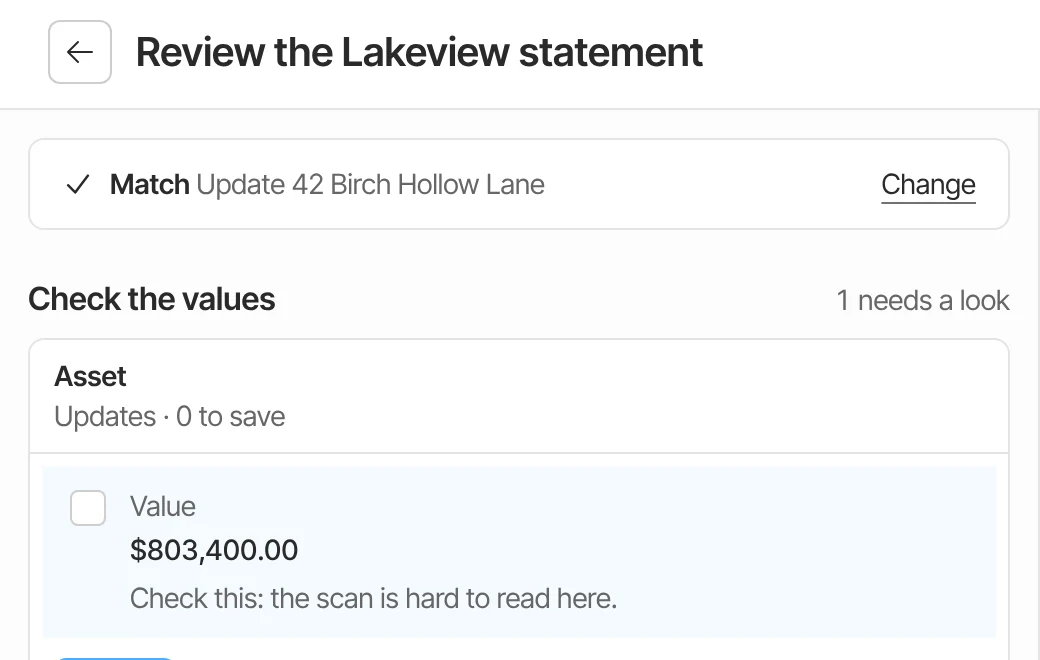
Each value it read sits beside the document, and selecting one jumps to its page. Values it wasn't sure of start unticked, marked Check this.
Step 3
Confirm
See exactly what changes, the current value against the new one, before anything is saved. Old values stay in history.
Step 4
Accept, or not
Nothing changes until a person accepts. An accepted batch can be undone, and proposals nobody acts on expire.

When sources disagree
Two answers become one question.
When two sources give different values for the same field of a record, Olomon keeps both claims, each with its source, and opens a finding so a person can confirm which is right.
When a document can’t be matched with confidence, or two records fit, it becomes a question instead of a guess. For insurance policies, when two documents disagree on the premium or the policy dates, the household’s advisor sees both values side by side.
One document, four places
A K-1 doesn’t just get filed.
It’s matched to the business it came from and proposes the income it reports, one income source per line, added only when a person accepts the review. Every value stays traceable to the K-1.
Step 1
Read beside its page
A partner's K-1, read into proposed values
Documents to facts
Step 2
Matched to the business
The LLC or partnership it came from
Ownership and entities
Step 3
Proposes income sources
One for each income line, added when the review is accepted
Net worth and income
Step 4
Keeps its source
Each value points back to the K-1 it came from
Evidence and provenance
AI and accuracy
AI that shows its work.
How Olomon reads, what it does when it isn’t sure, and what it will never do on its own, in detail.
Connected in the record
A document is only as useful as what it connects to.
Ownership and entities
A K-1 is matched to the partnership or company it came from, and each entity keeps its own files.
Taxes and private investments
K-1s, returns and capital account statements feed the tax picture and each private investment's paper trail.
Record intelligence
What's missing, stale or in conflict is flagged across the record, not only in the document you're reading.
Watch it read a hard document.
In the demo we walk through a sample household’s K-1s, statements and agreements, and show every trace. There’s nothing to send beforehand.